Automation Platform > Overview
Automation Platform overview
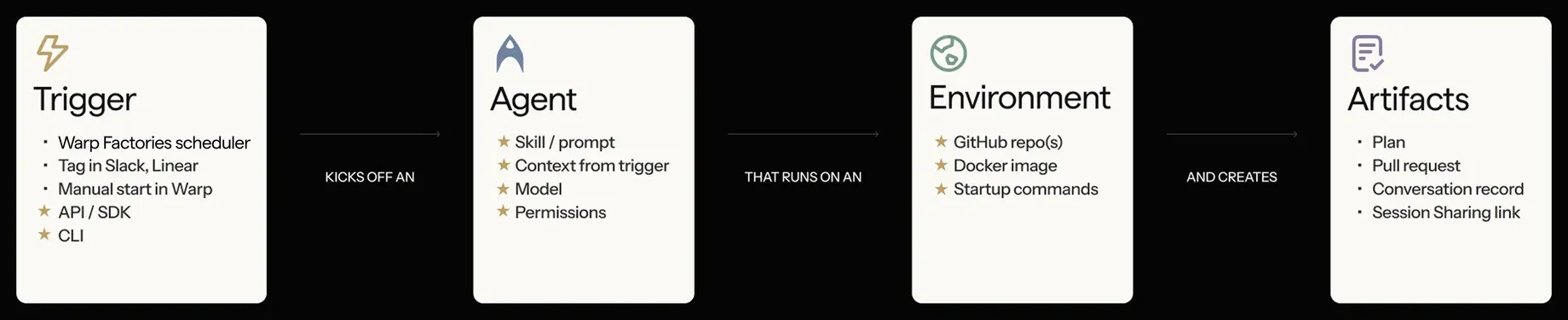
# Automation Platform overview [Warp Factories](/factories/) and [standalone cloud agents](/platform/) run on the Automation Platform. It provides the execution, configuration, and APIs they share. ## Start with a factory For a team workflow with planning, implementation, and review, start with the [Warp Factories quickstart](/factories/quickstart/). Then configure its [agents](/factories/factory-agents/configuration/), [automations](/factories/automations/), and [tools](/factories/mcp/). Already using the Oz web app, Oz CLI, or SDKs? Use [transitioning from Oz](/platform/transitioning-from-oz/) to assess that workflow. The [cloud agents overview](/platform/) retains standalone setup and management entry points. ## How a run works A request or event supplies the task and its context. The agent executes on its configured host and produces results such as a pull request, report, or transcript. For the factory task lifecycle and review points, see [how Warp Factories work](/factories/how-factories-work/). <figure style={{ maxWidth: "736px" }}>  <figcaption>A trigger starts a run that produces reviewable artifacts.</figcaption> </figure> ## Integrations and triggers [Factory automations](/factories/automations/) route events from [connected tools](/factories/connect-your-factory/) to factory agents. They also start runs on a schedule. For custom intake, use [webhooks](/factories/webhooks/) and [factory endpoints](/factories/factory-api/). Standalone workflows have separate [integrations](/platform/integrations/) and [scheduled runs](/platform/triggers/scheduled-agents/). The [CLI integration setup guide](/agents/cli/oz-cli/integration-setup/) covers their configuration. ## Inspecting results Inspect factory work from the [factory dashboard](/factories/factory-dashboard/). For standalone management, sharing, and steering, use the [cloud-agent inspection paths](/platform/#monitor-inspect-and-share-cloud-agent-runs). ## Environments Factories manage their workspace by default. [Cloud agent environments](/factories/environments/) cover the optional existing-environment path and standalone setup; [runners](/factories/runners/) cover compute configuration. ## Hosts For factory hosting choices and requirements, compare [Warp-hosted execution](/factories/warp-hosting/) with [managed self-hosting](/factories/self-hosting/). [Unmanaged execution](/platform/unmanaged-execution/) covers standalone CLI workflows on infrastructure you operate. ## The CLI Use the [Oz CLI](/agents/cli/oz-cli/) for existing `oz` workflows and the [Warp Agent CLI](/agents/cli/) for `warp` commands. Check the owning reference before changing a script. ## API and SDKs Use [factory endpoints](/factories/factory-api/) to send work to a factory, and [agent and run endpoints](/factories/api-and-sdk/) for standalone runs and run inspection. [Developer tools](/factories/developer-tools/) links to the SDKs and full API reference. ## Secrets Use [factory secrets](/factories/secrets/) for credentials granted to factory agents and [harness authentication](/factories/harnesses/authentication/) for third-party provider credentials. The [legacy secrets reference](/platform/secrets/) preserves standalone CLI and personal-secret workflows. ## Shared configuration Factory-wide and per-agent settings live in the [factory definition](/factories/factory-as-code/). The shared [harness](/factories/harnesses/), [environment](/factories/environments/), and [MCP-server](/factories/mcp/) references explain factory and standalone configuration separately. For instructions and reusable context, see [factory skills](/factories/factory-skills/), [Rules](/agents/capabilities/rules/), [saved prompts](/knowledge-and-collaboration/warp-drive/prompts/), and [environment variables](/knowledge-and-collaboration/warp-drive/environment-variables/). These have different scopes; follow the relevant reference. ## Measuring factory work Use [Scorers](/factories/measure-and-improve/scorers/), [Benchmarks](/factories/benchmarks/), and [Self-improvement](/factories/measure-and-improve/self-improvement/) to evaluate factory work and propose changes to its configuration. See [measure and improve](/factories/measure-and-improve/) for metric definitions and limitations. ## Related pages * [Warp Factories quickstart](/factories/quickstart/) - Create a factory and send its first work item * [Cloud agents overview](/platform/) - Find supported standalone entry points * [Architecture](/platform/architecture/) - Review the run lifecycle and data boundaries * [Multi-agent orchestration](/platform/orchestration/) - Coordinate parent and child agentsTell me about this feature: https://docs.warp.dev/platform/overview/Find factory setup and shared runtime references, with separate entry points for existing standalone cloud-agent workflows.
Warp Factories and standalone cloud agents run on the Automation Platform. It provides the execution, configuration, and APIs they share.
Start with a factory
Section titled “Start with a factory”For a team workflow with planning, implementation, and review, start with the Warp Factories quickstart. Then configure its agents, automations, and tools.
Already using the Oz web app, Oz CLI, or SDKs? Use transitioning from Oz to assess that workflow. The cloud agents overview retains standalone setup and management entry points.
How a run works
Section titled “How a run works”A request or event supplies the task and its context. The agent executes on its configured host and produces results such as a pull request, report, or transcript. For the factory task lifecycle and review points, see how Warp Factories work.
Integrations and triggers
Section titled “Integrations and triggers”Factory automations route events from connected tools to factory agents. They also start runs on a schedule. For custom intake, use webhooks and factory endpoints.
Standalone workflows have separate integrations and scheduled runs. The CLI integration setup guide covers their configuration.
Inspecting results
Section titled “Inspecting results”Inspect factory work from the factory dashboard. For standalone management, sharing, and steering, use the cloud-agent inspection paths.
Environments
Section titled “Environments”Factories manage their workspace by default. Cloud agent environments cover the optional existing-environment path and standalone setup; runners cover compute configuration.
For factory hosting choices and requirements, compare Warp-hosted execution with managed self-hosting. Unmanaged execution covers standalone CLI workflows on infrastructure you operate.
The CLI
Section titled “The CLI”Use the Oz CLI for existing oz workflows and the Warp Agent CLI for warp commands. Check the owning reference before changing a script.
API and SDKs
Section titled “API and SDKs”Use factory endpoints to send work to a factory, and agent and run endpoints for standalone runs and run inspection. Developer tools links to the SDKs and full API reference.
Secrets
Section titled “Secrets”Use factory secrets for credentials granted to factory agents and harness authentication for third-party provider credentials. The legacy secrets reference preserves standalone CLI and personal-secret workflows.
Shared configuration
Section titled “Shared configuration”Factory-wide and per-agent settings live in the factory definition. The shared harness, environment, and MCP-server references explain factory and standalone configuration separately.
For instructions and reusable context, see factory skills, Rules, saved prompts, and environment variables. These have different scopes; follow the relevant reference.
Measuring factory work
Section titled “Measuring factory work”Use Scorers, Benchmarks, and Self-improvement to evaluate factory work and propose changes to its configuration. See measure and improve for metric definitions and limitations.
Related pages
Section titled “Related pages”- Warp Factories quickstart - Create a factory and send its first work item
- Cloud agents overview - Find supported standalone entry points
- Architecture - Review the run lifecycle and data boundaries
- Multi-agent orchestration - Coordinate parent and child agents